Transfer everything from old computer to new computer with Windows 11
Transfer programs and files to new computer
Transfer files from one computer to another
Research data: Windows and migration statistics
Transfer Microsoft Office to new computer
Restore programs and files from a broken or dead computer
Transfer directly from an old hard drive
Transfer to new computer using a USB hard drive
Corporate Windows 11 migration
User Profile Migration to new PC / new domain
How To Migrate Local Profiles to Azure AD
Migration to Server 2019 / 2016
Transfer everything from old computer to new computer with Windows 11
Transfer programs and files to new computer
Transfer files from one computer to another
Research data: Windows and migration statistics
Transfer Microsoft Office to new computer
Restore programs and files from a broken or dead computer
Transfer directly from an old hard drive
Transfer to new computer using a USB hard drive
Corporate Windows 11 migration
User Profile Migration to new PC / new domain
How To Migrate Local Profiles to Azure AD
Migration to Server 2019 / 2016
Transfer programs and files to new computer
Transfer files from one computer to another
Transfer Microsoft Office to new computer
Restore programs and files from a broken or dead computer
Transfer directly from an old hard drive
Transfer to new computer using a USB hard drive
Move To New PC - Compare Options
Migration Kit Pro - Advanced Transfer
Transfer programs and files to new computer
Transfer files from one computer to another
Transfer Microsoft Office to new computer
Restore programs and files from a broken or dead computer
Transfer directly from an old hard drive
Transfer to new computer using a USB hard drive

Updated February 2026 · 2 minute read
How to Backup and Restore your Windows 11 (or 10) – without losing your programs and files
In this article, we will learn how to backup and restore your PC, so that you can safely reinstall Windows and do a complete system wipe and refresh – while keeping your programs, profiles, accounts, settings, documents, pictures, music, movies, favorites, and all files.
This works for Windows 11, Windows 10 and older, is straightforward to use (no need to be a technical guru), and ensures that no files are lost in the process.
The product we will be using is Migration Kit Pro, which allows to easily back up, and most importantly to easily restore programs, settings and files after reinstalling Windows (even if you are switching to a different Windows version!).
Let’s see how it’s done!
Backup your Windows
The most important part of a backup-and-restore process is to have a full, complete backup of your computer. This is crucial – without a proper backup, you will lose your programs and data if you wipe the system clean. Here are the simple steps to do it:
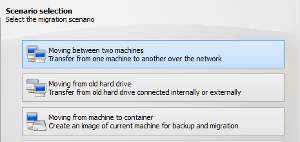
- Download and run Zinstall Migration Kit Pro on your computer.
- Use its 3rd option, “Moving from Machine to Container”.
- Select the C: drive on Source selection, and select a place to store your backup container (it’s just a big file) in the Target browse selection.
- A good place to store the container is a USB external hard drive. Alternatively, you can use a network drive, another hard drive in the computer etc.
- Start the backup process. This should take a long while, and you will see a message confirming that the container has been created successfully.
That’s it – with just a few clicks, your stuff is now safe, and we can proceed to resetting Windows on this computer.
You can now safely reset your computer, and then proceed to restore your programs and files right back.
Restore your programs and files from backup
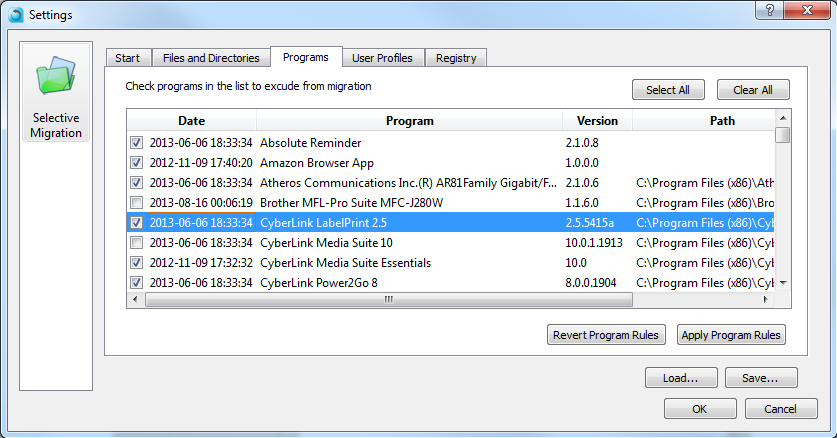
- Once you have your fresh new Windows, it is time to restore your programs, settings and files from the backup you’ve made before.
- To do that, run Migration Kit Pro and use the 4th option, “Moving from Container to Machine”.
- Point it to the backup container you’ve created in the first section, and it will restore everything, including programs, settings and files, to the new Windows.
- If you don’t want to restore everything, you can also exclude some programs / folders you don’t want to recover.
That’s it – you have a successfully reset your computer, and kept your programs, accounts and files right they should be!
Ready to backup and restore your Windows computer?
Related Guides
guaranteeAny PC, any Windows Buy now